The Alyvisun weighted stand is the best headphone stand for most UK desks: its curved, padded rest supports one pair without demanding much worktop space. Choose the Klearlook clamp if the desk is crowded, the Avantree dual stand for two pairs, the Tebery wooden stand if the headphones are part of the room, or the Razer Base Station V2 only if you will use its PC-connected hub. The right shape and placement matter more than a decorative finish.
Our top 5 picks

Alyvisun weighted headphone stand
Best overall
A padded curved rest and compact base make it the most adaptable single-pair desk choice.

Klearlook spring-clamp headphone hook
Best for a small desk
Moves one headset off the worktop, provided your desk edge fits the clamp.
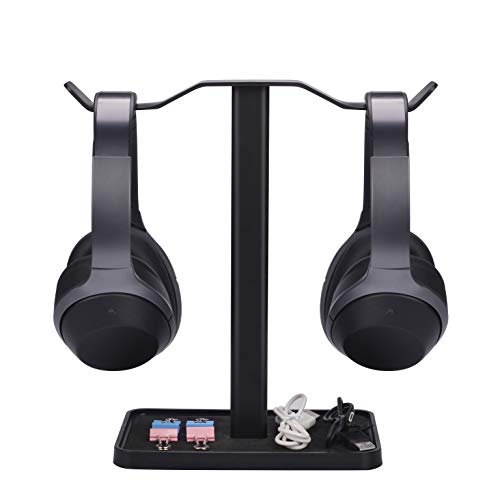
Avantree Neetto dual headphone stand
Best for two pairs
Two hanging positions and one shared base suit a work pair and a listening pair.
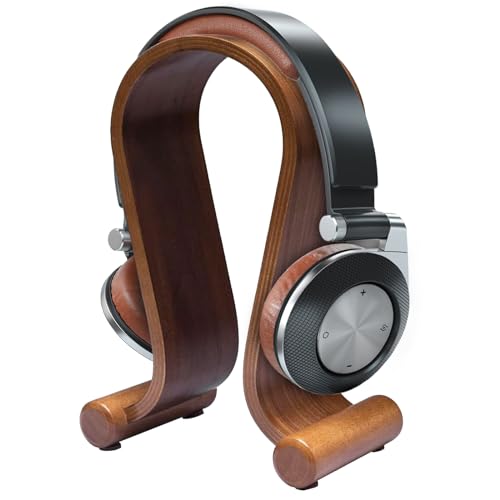
Tebery wooden headphone stand
Best wooden display
An arched wooden rest for a visible, furniture-like setup rather than hidden storage.

Razer Base Station V2 Chroma
Best gaming hub
Adds PC-connected USB ports, a headset audio jack and RGB lighting to the stand.
Choosing a stand is only part of looking after a headset. Our headphone cleaning and maintenance guide covers the pads and headband that touch the support.
In this guide
- Comparison at a glance
- Five headphone stands and storage options
- Which headphone stand should you buy?
- How to choose a headphone stand
- Storage and care between listening sessions
- How we chose
- The bottom line
- Frequently asked questions
Comparison at a glance
A freestanding post, a clamp and an arched wooden rest solve different problems. Measure the available desk space and note where the band will actually touch the support before deciding by looks alone.
| Stand | Best for | Mount and footprint | Main compromise |
|---|---|---|---|
| Alyvisun weighted stand | One everyday pair | Freestanding; about 10 × 10cm base | Uses desk space; 24cm height may not suit every cable |
| Klearlook clamp hook | Keeping a desk clear | Spring clamp; desk edge about 13–39mm thick | Needs a suitable edge and clear space beneath it |
| Avantree Neetto dual | Two pairs in reach | Freestanding; roughly 17 × 11cm base | Exposed hanging points suit some headbands better than others |
| Tebery wooden stand | A visible wooden display | Freestanding arch; about 16 × 11cm base | Broader footprint and no cable organiser |
| Razer Base Station V2 | A PC gaming desk | Freestanding; 12cm-diameter base | Costs much more than a plain stand; hub needs a PC |
The measurements describe the selected versions, not every similarly named stand. Check that your headphones, cable and desk edge fit together, particularly with a clamp or a low shelf above the desk.
Five headphone stands and storage options
1. Alyvisun weighted stand: best overall
This is the sensible default for one pair. The selected silver Alyvisun is 24cm high with a roughly 10 × 10cm base and a curved TPU headband rest. That broader contact point is more reassuring than a narrow bare-metal hook, particularly for a soft headband. The weighted base and small footprint make it easier to place beside a monitor without committing the desk edge to a clamp.
It is not a cable organiser, and a long wired lead may still touch the worktop. Measure the height of your headphones from the top of the headband to the bottom of the cups; a tall headset can leave little clearance. It is a practical stand rather than a furniture piece, which is exactly why it is the pick for most people.
- Choose it if: you want an uncomplicated single-pair stand with a cushioned contact point.
- Skip it if: there is no free surface on your desk.
- Main compromise: compact and easy to move, but it does not hide the headset or tidy its cable.
2. Klearlook spring-clamp hook: best for a small desk
The black Klearlook puts the headphones beside or beneath the worktop instead of using a square of desk surface. Its spring clamp is specified for an edge about 13–39mm thick, and the hanger swivels through 360 degrees. A cable clip is included. This makes more sense than another upright stand on a desk already crowded with a keyboard, speakers and papers.
The fit check is essential: measure the actual edge, including any reinforcing lip, and make sure a drawer or knee will not hit the hanging earcups. The hook contacts a narrower part of the headband than a broad arch does, so delicate or heavily padded bands deserve a closer look. The specified one-kilogram capacity is ample for ordinary headphones, but it is not a reason to overload a weak desk edge.
- Choose it if: you can clamp a clear desk edge and want the worktop back.
- Skip it if: your desk has a deep lip, a drawer under the edge or no safe hanging clearance.
- Main compromise: almost no worktop footprint, but more desk-compatibility checks.
3. Avantree Neetto dual: best for two pairs
If you swap between a work headset and listening headphones, the Avantree Neetto keeps both accessible on one base. Avantree specifies a 25cm height, a 17 × 11cm base and a mixed metal-and-ABS construction for the HS908. That is a cleaner arrangement than balancing two separate stands around a monitor.
The open hanger is not as broad or padded as the Alyvisun rest, so inspect how your particular headbands sit on its two arms. Two pairs also double the visible cable clutter unless you tie leads separately. It earns its place by solving a genuine two-pair problem, not because a dual stand is automatically better for a single headset. If one of your pairs is for gaming, our gaming headset guide covers the headset decision itself.
- Choose it if: two pairs need a permanent, reachable home.
- Skip it if: you own only one pair or need a broad padded rest for each band.
- Main compromise: efficient shared footprint, with slimmer hanger contact points.
4. Tebery wooden stand: best wooden display
The Tebery has the opposite appeal to an under-desk hook: it makes the headphones a visible part of the setup. Its curved wooden arch follows the shape of an over-ear headband, with a stated 26cm height and 16 × 11cm footprint. Rubber feet help it sit on a smooth worktop. Choose it for a study or listening corner where a plain metal post would look out of place.
It is larger than the Alyvisun and does not gather a cable or offer powered extras. Check that your headband sits naturally on the curve without pressing the ear pads hard against the sides; different headphone shapes will rest differently. A wooden finish is an aesthetic reason to buy it, not evidence that it protects every pair better. Our over-ear versus on-ear guide can help if you are choosing the headphones and their storage together.
- Choose it if: you want a wooden display stand with an arched rest.
- Skip it if: the stand must disappear beneath a desk or your headset fits the arch poorly.
- Main compromise: a more considered look, at the cost of worktop space.
5. Razer Base Station V2 Chroma: best gaming hub
This black Base Station V2 earns a place only when the extra connections will be used. Razer specifies two USB 3.1 ports, a 3.5mm headset port with a built-in DAC, RGB lighting, a 27.8cm height and a 12cm-diameter base. It can keep a PC gaming headset and a couple of USB peripherals together without a separate hub.
The important limitation is power and compatibility: Razer says the hub needs a free PC USB port; a USB charger is not a substitute for its intended connection. The 3.5mm port serves a wired headset, not a wireless pair merely resting on top. This V2 also costs considerably more than an ordinary stand. Treat it as a conditional PC-hub choice, not a value buy for someone who only needs storage. If you are still choosing the headset, our wired-headphone guide explains the broader options.
- Choose it if: a PC-connected USB and audio hub is useful at your gaming desk.
- Skip it if: you want only storage or rely on a console or charger for the hub features.
- Main compromise: a substantial cost premium, plus a cable and PC dependency.
Which headphone stand should you buy?
Buy the Alyvisun for a single pair on an ordinary desk. The curved padded rest and small base address the two things most owners will notice: where the headband touches and how much space the stand occupies. Choose the Klearlook when the worktop itself is the problem, but measure the edge before ordering. Choose the Avantree only if two pairs genuinely need a home.
The Tebery earns its space when you want a wooden display; the Razer earns its price only when you will use the PC hub. The common mistake is buying from a photograph before checking headset height, headband contact and the space beneath or around the desk.
How to choose a headphone stand
Check the contact point
A broad, smooth rest spreads contact across more of the headband than a thin hook. Look for padding or a well-finished curve, especially with soft leather-like or fabric bands. Do not assume a stand prevents wear: its geometry must suit your headphones. On an arched stand, also check that the earcups are not being pushed together or against a hard side. Our headphone buying guide explains why band and pad construction vary so much.
Measure the whole space
For a freestanding model, measure the base, headset height and any shelf above it. For a clamp, measure the thickest part of the desk edge, the depth of any lip and the space where the cups will hang. A hook that fits the tabletop but catches a drawer is not a space-saving solution. If your desk moves up and down, route cables so they do not snag as the height changes.
Decide whether you need a hub
RGB and USB ports add a power cable and may require a computer. They are useful only when the connection suits your equipment. A stand cannot charge a wireless headset merely by supporting it unless its exact model includes a compatible charging feature. The Razer V2 is a PC-connected hub, not a wireless charging dock.
Storage and care between listening sessions
A stand is not a travel case
A stand gives a daily-use pair somewhere predictable to live. It does not protect headphones from dust, spills, pets or a bag full of other gear. If your model came with a case, use it when the headphones are stored for longer or carried away from the desk. Apple’s Beats care guidance likewise recommends cleaning and drying headphones and using their protective case.
Keep cables and moisture clear
Leave a little slack in a wired lead rather than winding it tightly around a hook or hanging its plug under tension. Keep the stand away from drinks and let damp pads dry before putting headphones into a closed case or charging them. A stand helps organisation; cleaning and sensible storage still do the real maintenance work.
How we chose
We compared five distinct ways of storing headphones: a padded single stand, a desk-edge clamp, a two-pair stand, a wooden arch and a powered gaming hub. The criteria were headband contact, stability or mounting fit, footprint, cable and port usefulness, and the main limitation a buyer should check. We have not used these five stands for a long-term wear test, so claims about years of durability or universal compatibility would be guesswork.
The bottom line
Start with the space you can spare and the shape of your headband. A padded single stand is the most versatile default here; buy a clamp, dual hanger, wooden arch or powered hub only when that arrangement solves a problem the simple stand cannot.
Frequently Asked Questions
Which headphone stand is best for most desks? The Alyvisun weighted stand is the most adaptable single-pair choice here. Its compact base and curved padded rest suit an ordinary desk, provided your headset has enough height clearance.
Will a headphone stand damage the headband? It depends on the contact point and the headphones. A broad, smooth rest is kinder to a soft headband than a narrow sharp edge. Check how your exact pair sits rather than assuming every stand is protective.
Will the Klearlook clamp fit my desk? The selected clamp is specified for an edge about 13–39mm thick. Measure the thickest part of the edge and check for a lip, drawer and enough room for the cups beneath it.
Can the Avantree dual stand hold two headphones? Yes. It has two hanging positions on one base. Check that both headbands sit comfortably on its slimmer contact points and that the base has room beside your other desk equipment.
Does the Razer Base Station V2 charge wireless headphones? No wireless charging is specified for this model. Its USB and 3.5mm audio features require a PC USB connection; simply hanging a wireless headset on it does not charge the headset.